DDR5 represents a fundamental architecture shift that addresses multiple performance limitations simultaneously. For professionals editing high-resolution footage and gamers pushing maximum settings, understanding what Lexar DDR5 actually delivers helps determine whether upgrading makes sense for specific workflows.
System memory acts as the bridge between storage and processing. When that bridge becomes a bottleneck, even powerful CPUs and GPUs sit idle, waiting for data. DDR4 memory served well for years, but modern workflows — 8K editing, real-time ray tracing, heavily modded games — demand more bandwidth than DDR4 can provide. DDR5 memory introduces several technical changes that work together to improve performance beyond simple speed increases.
DDR5 Architecture Advantages
Higher transfer rates. DDR5 starts at 4800MT/s baseline and scales to 7200MT/s, and beyond. DDR4 memory topped out around 3200MT/s-3600MT/s for most mainstream applications, with enthusiast kits reaching 4000MT/s-4800MT/s.
The Lexar® ARES RGB 2nd Gen DDR5 Desktop Memory offers speeds up to 8000MT/s, more than double typical DDR4 performance.These higher transfer rates directly impact applications that move large data sets frequently. Video editing software constantly shuffles footage between storage, RAM, and processors. Higher bandwidth means less time waiting for data transfers.
Dual-channel architecture per module. DDR5 splits each module into two independent 32-bit channels. DDR4 modules operate as single channels. This architectural change means a dual-module configuration actually provides four memory channels instead of two.
For workloads with multiple simultaneous memory requests, like rendering while previewing effects, this independent channel architecture reduces wait times. One process accessing memory doesn’t block another as severely as with DDR4’s single-channel design.
On-die Error Correction Code (ECC). DDR5 includes basic error correction built into every module. Previous ECC implementations required specialized server memory.
Lexar® THOR RGB DDR5 Desktop Memory features on-die ECC for improved stability and reliability.This error correction doesn’t catch every possible error like full ECC server memory, but it significantly reduces data corruption from minor electrical variations. For long rendering jobs or extended gaming sessions, stability matters as much as raw performance. This product is for system builders.
On-board power management. DDR5 moves power regulation onto each memory module with dedicated Power Management ICs (PMICs). DDR4 handled power management from the motherboard to provide stable voltage delivery under varying loads.
Stable power delivery becomes critical when pushing memory to higher frequencies. Voltage fluctuations cause instability and crashes. The PMIC integration in products like Lexar® ARES RGB 2nd Gen DDR5 Desktop Memory helps maintain consistent performance even during intensive workloads.
Where DDR5 Impacts Video Editing Workflows
Video editing applications benefit from DDR5 in specific, measurable ways. Understanding where improvements occur helps set realistic expectations.
Timeline scrubbing and preview performance. Scrubbing through 4K or 8K footage requires pulling frames from storage into memory, applying effects, and displaying the result. Higher memory bandwidth means faster frame loading and more responsive preview playback.
This responsiveness particularly matters for multicam editing. Four 4K streams playing simultaneously demand significant memory bandwidth. DDR5’s higher transfer rates reduce stuttering during multicam preview, making edit decisions faster and more confident.
Effects processing and real-time playback. Color grading, compositing, and effects stacks require substantial memory bandwidth. The software loads source footage, applies changes, and writes results back to memory, all while maintaining real-time playback if possible.
DDR5’s bandwidth advantage helps maintain real-time playback with heavier effect stacks to extend how many effects you can stack before dropping to non-realtime rendering.
Rendering performance. During final renders, multiple processor cores work simultaneously on different portions of the timeline. Each core needs memory access to load source footage, apply effects, and write output. DDR5’s dual-channel-per-module architecture reduces memory access conflicts between cores.
The performance gain varies by project complexity and system configuration, but renders that previously took forty minutes might complete in thirty-two to thirty-five minutes with DDR5. Not revolutionary, but meaningful when facing daily deadline pressures.
Application loading and switching. Editing applications are memory-intensive. Adobe Premiere Pro, DaVinci Resolve, and Final Cut Pro can easily occupy 8GB-16GB when working with complex projects. Switching between applications or loading projects faster improves workflow efficiency even if render times don’t change dramatically.
Game Performance: Where DDR5 Makes a Difference
Game performance depends on many factors. DDR5 provides benefits in specific scenarios while showing minimal difference in others.
CPU-limited gaming scenarios. When games run at lower resolutions or with settings that allow very high frame rates, the CPU often becomes the limiting factor. Memory bandwidth directly impacts how quickly the CPU can access game data and prepare frames for the GPU.
Competitive gamers targeting 240FPS or higher at 1080p often see meaningful frame rate improvements with DDR5. The difference between 220FPS and 250FPS might seem minor, but competitive players value every frame.
Open-world games with large environments. Games with massive worlds like Cyberpunk 2077, Red Dead Redemption 2, or heavily modded Skyrim constantly stream environment data into memory. Higher bandwidth reduces texture pop-in and stuttering when moving quickly through environments.
These improvements show up as smoother experiences rather than higher frame rate counters. Less micro-stuttering. Fewer brief hitches during fast camera movements. Subjectively noticeable even when average frame rates don’t change dramatically.
Heavy modification and high-resolution textures. Modded games with 4K or 8K texture packs require substantial memory bandwidth to load detailed textures. DDR5’s higher speeds reduce texture streaming delays, making heavily modded games feel more responsive.
GPU-limited scenarios show minimal gains. When running 4K resolution with maximum ray tracing and settings that push GPU utilization to 95%+, memory speed makes little difference. The GPU becomes the bottleneck, and faster system memory can’t help because the GPU isn’t waiting on it.
This limitation means DDR5 provides the biggest gaming benefits at 1080p or 1440p where CPUs work harder relative to GPUs.

Lexar DDR5 Product Lineup Overview
Lexar offers several DDR5 options optimized for different priorities and system configurations.
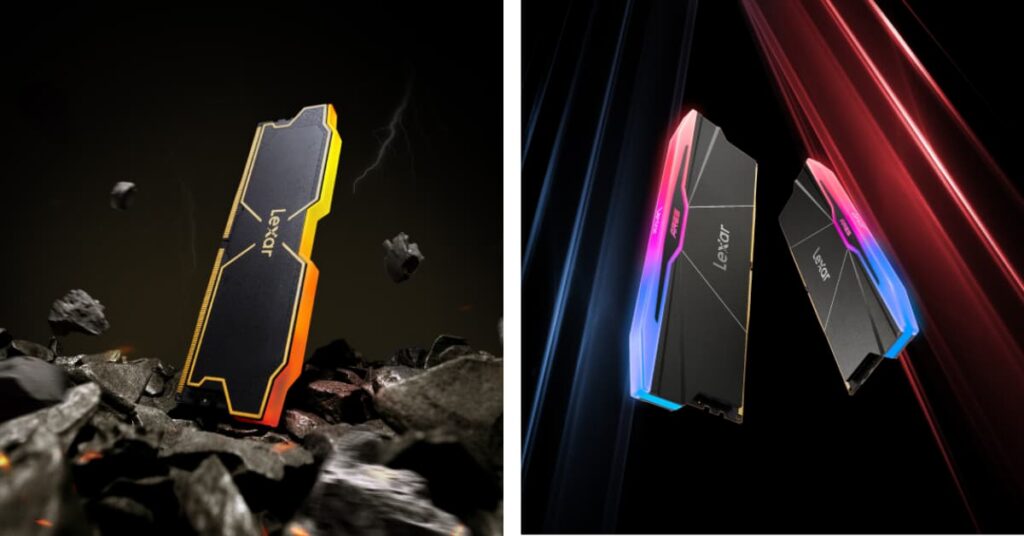
Lexar® ARES RGB 2nd Gen DDR5 Desktop Memory uses premium SK hynix chips for improved overclocking potential and stability. The 1.88mm heatsink provides superior cooling compared to standard ARES modules, making these suitable for sustained heavy workloads or aggressive overclocking. If you’re building a visible system with tempered glass panels, the customizable RGB lighting integrates with major motherboard lighting ecosystems – ASUS Aura Sync, Gigabyte RGB Fusion 2.0, MSI Mystic Light Sync, and ASRock Polychrome.
For professionals running long renders or intensive gaming sessions, the improved thermal management helps maintain stable performance without thermal throttling.
Lexar® THOR RGB DDR5 Desktop Memory prioritizes compact form factor without sacrificing performance. At only 40mm high with a thin 1.6mm aluminum heatsink, these modules fit systems with large CPU coolers or small form factor builds where standard-height RAM creates clearance issues.
The THOR line proves you don’t need massive heatsinks for effective DDR5 performance. Efficient thermal design matters more than heatsink size.
Lexar® THOR OC DDR5 Desktop Memory serves overclockers and enthusiasts wanting maximum performance in compact packaging. The same 40mm height accommodates tight builds while supporting speeds up to 6000MT/s.
Optimizing DDR5 for Your Workflow
Simply installing DDR5 memory doesn’t automatically deliver optimal performance. Configuration matters.
Enable XMP 3.0 or EXPO™ profiles. DDR5 modules ship with JEDEC default speeds (typically 4800MT/s) but include performance profiles for higher speeds. Lexar DDR5 modules support both Intel XMP 3.0 and AMD EXPO™ standards.
Enabling these profiles in BIOS takes thirty seconds and immediately activates the rated speeds. Without profile activation, expensive 7200MT/s memory runs at baseline 4800MT/s – wasting money spent on higher-speed modules.
Verify four-slot population when possible. Motherboards with four memory slots benefit from using all four slots (four single-rank modules) or two slots with dual-rank modules. This configuration maximizes DDR5’s architectural advantages.
Budget constraints sometimes mean starting with two modules and adding more later. That’s fine, but understand that going from two modules to four provides additional performance gains beyond just capacity increases.
Match memory to other system components. DDR5-7200 memory paired with a mid-range processor and moderate GPU won’t deliver proportional benefits. The memory speed exceeds what other components can utilize effectively.
Conversely, high-end processors with powerful GPUs see meaningful benefits from faster DDR5. Match memory specifications to overall system capability rather than buying the fastest RAM regardless of other components.
Monitor temperatures during heavy workloads. While DDR5 modules include thermal solutions, sustained heavy use can generate heat. If memory temperatures climb above 60°C-65°C during long renders or gaming sessions, consider improving case airflow.
Most systems with reasonable airflow won’t encounter thermal issues, but compact cases or systems with restricted airflow may need attention to memory cooling.
When DDR5 Upgrades Make Sense
DDR5 represents an investment. Understanding when that investment provides meaningful returns helps make informed decisions.
Building new systems. For new builds with 12th generation Intel or newer processors, or AMD Ryzen 7000/9000 series processors, DDR5 makes clear sense. These platforms don’t support DDR4, eliminating the decision entirely. The question becomes which DDR5 specification matches your workflow needs.
Upgrading existing DDR4 systems. Upgrading to DDR5 means replacing the motherboard and processor alongside memory is a substantial investment.
The upgrade makes sense if current systems struggle with memory-intensive tasks. If you’re regularly hitting memory capacity limits, experiencing stuttering during multicam editing, or seeing memory usage warnings, the upgrade provides clear benefits.
If current systems perform adequately for your workflows, waiting makes more sense. Memory prices decline over time, and waiting six to twelve months often means better DDR5 specifications at lower prices.
Professional workflows with tight deadlines. For professionals where time directly equals money, performance improvements that save ten to fifteen minutes per project quickly justify upgrade costs. Calculate potential time savings across typical monthly project volumes to determine whether the investment pencils out.
Enthusiast gaming and overclocking. Enthusiasts pursuing maximum performance and enjoying the tuning process find value in high-end DDR5. The satisfaction of optimization and achieving peak performance provides value beyond simple frame rate improvements.

DDR5 in the Context of Complete Systems
Memory represents one component in balanced systems. DDR5 delivers its best results when other components can utilize the additional bandwidth.
Video editing workstations benefit from DDR5 when paired with multi-core processors (12+ cores), fast NVMe storage for footage, and capable GPUs for effects acceleration. The memory upgrade complements other high-performance components rather than compensating for weaknesses elsewhere.
Gaming systems see DDR5 benefits primarily at high refresh rates where CPU performance matters. Pairing DDR5 with high-end CPUs (Intel Core i7/i9 or AMD Ryzen 7/9) and targeting 1080p or 1440p at 144Hz+ makes sense. Gaming at 4K 60Hz emphasizes GPU performance more than memory speed.
Budget-conscious builds might prioritize other components first. Spending $200 on DDR5-7200 instead of $120 on DDR5-5600 means $80 less for GPU or storage. For many users, investing that difference in GPU performance provides more noticeable benefits than the memory speed increase.
Lexar’s range of DDR5 options — from mainstream and compact THOR to performance-focused ARES RGB 2nd Gen — allows matching memory specifications to specific build requirements and budgets. The key is selecting appropriate specifications rather than automatically choosing the fastest available option.
DDR5 memory continues evolving. Speeds increase. Prices gradually decline. Compatibility improves. For those building new systems or upgrading from several generations back, DDR5 offers meaningful performance improvements in memory-intensive workflows. Understanding where those improvements occur helps make informed decisions about when DDR5 makes sense for your specific needs.